CoachOn Tennis
Chart every point.
Track every player.
Chart matches, track players, analyse technique and follow progress over time — the all-in-one app for coaches, parents and players.

Free to start · works offline

Chart every point as you watch.
Tap under whoever won the point — the app keeps the score, tracks the serve and records exactly how each point ended.
- Winners, aces, double faults, forced and unforced errors
- Serve number, net points and rally length
- Singles and doubles, tiebreaks and no-ad

Every stat, side by side.
Both players' numbers laid out clearly, for the whole match or set by set — with a report you can download and share.
- Serve %, winners, errors, net points and aggression margin
- Total and set-by-set breakdowns
- Downloadable statistics for players and parents

See momentum shift, point by point.
A momentum line maps every single point, so you can show a player exactly where the match was won and lost.
- Every point plotted, up for one player and down for the other
- Markers for aces, winners and errors along the line
- Spot the runs and turning points at a glance

Time a whole squad at once.
Give each player their own stopwatch — start together, then stop and log each one as they finish, straight into their drill scores.
- Stopwatch, countdown, or one timer per player
- Log finish times as drill scores in a tap
- Built for coaching a group, not just one person

Rank the group on any drill.
Turn a drill into a leaderboard and give players something to chase — filter it by group or age to keep it fair.
- Rankings for every drill, with medals up top
- Filter by group or birth year
- Download and share the board

Compare progress over time.
Overlay several players on one chart to see who's climbing and who's plateaued — the proof that the work is paying off.
- Multiple players on a single progress chart
- Best, average and latest at a glance
- Spot who's improving and who needs attention

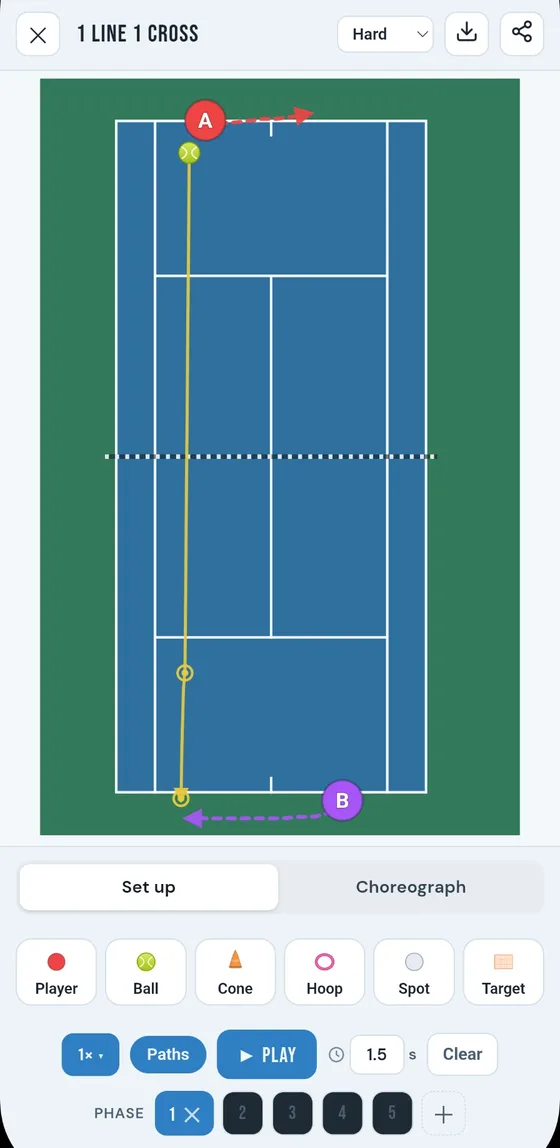
Sketch and animate any drill.
Lay out the court in seconds, then press play to watch it run — a clear picture of the drill for you, your players, and any coach you share it with.
- Players, balls, cones, hoops, spots and target zones
- Drag out movement and ball paths, then split it into phases
- Play it back and export an animated GIF or a still image
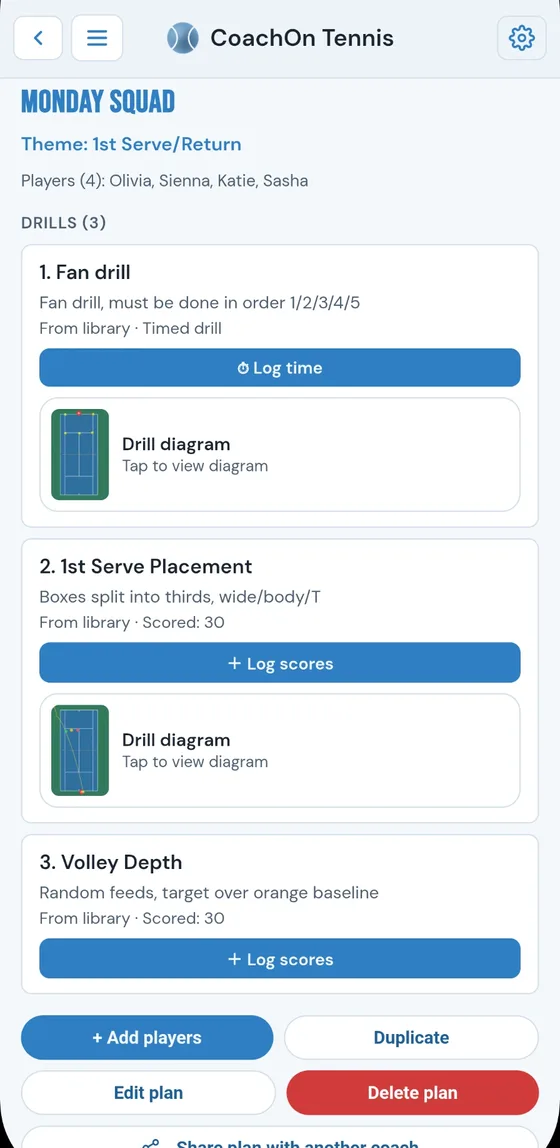
Build a lesson, reuse it anywhere.
Give a session a theme and a few notes, then line up the drills you'll run — pulled from your library or typed in on the spot. Plans aren't tied to a player, so you can run the same one with any group.
- A theme, notes and an ordered list of drills
- Mix library drills with your own custom ones
- Log scores or times, and share a plan with another coach
Eight tools combined into one app.
Quick to log and instant to read back — whether you're coaching a squad, following your child, or tracking your own game.

Match Charting
Tap under whoever won the point. Aces, winners, forced and unforced errors, net points and serve stats — captured as you watch.
Match Statistics
Every stat side by side, plus a momentum chart that shows exactly where a match turned.PRO
Technical Analysis
Freeze a photo or video frame and draw lines, angles and shapes to break down technique.
Drills & Timers
Time-scored drills with a stopwatch, countdown, or a stopwatch per player for a whole squad at once.
Leaderboards
Rank a group on any drill to spark a bit of competition — and give players something to chase.
Comparison Charts
Overlay several players' progress on one chart to see who's climbing and who's plateaued.
Drill Creator
Design an animated bird's-eye drill — players, ball paths, cones and target zones — then play it back and export a GIF.PRO
Session Planner
Build reusable lesson plans with a theme, notes and an ordered mix of library and custom drills.
Start free. Go Pro when you're ready.
- Up to 3 players, drills and matches
- Full match charting & every charted match's stats
- Drills, scores, timers, leaderboards & progress charts
- Technical Analysis — draw over photos and video frames
- Session Planner, plus viewing any saved drill diagram
- Unlimited players, drills and matches
- Lifetime statistics & averages across every match
- Side-by-side Compare (photos & video) & multi-player timers
- Drill Creator — design, animate & export drill diagrams
- Customisable reports to share with players and parents
Subscriptions are billed through Google Play or the App Store. Cancel anytime.
Everything you track. One tennis app.
Free to download, works with no signal, and your data stays on your device.